30 November 2007

Three links you for GPG ("gnu-ish PGP) on Mac

Just in case you need to setup a PGP-like infrastructure on Mac-OS: I recommend the GNU-GPG-tools
for it - and found helpful instructions on MacGPG-site.


  1. Download the files from Sourceforge. You'll surely need "GnuPG for OSX" and "GPG KeyChain Access" (makes life much easier).

  2. Point your browser to the cool docu (by Zeitform).

  3. In case you need to pgp-encrypt EMail (I'm sure you need to!), get GPGMail (from SENTE), also free.


Installation is very straightforward.

Then you

  • (must) generate your own key (unless you already have one and it's still valid!),

  • (should propably) upload your public key to a keyserver (the default keyserver of GPG works fine),

  • (have to) find the keys of your communication partners, either on the public keyservers or from them directly,

  • (should) publish your key's fingerprint, so others can verify a downloaded key... (put it on your website, find mine here). In case your're too lazy to klick: 9E64 477B 0BCF A2C6 C868 68B3 CF32 9C31 4E1A 26BA


And you're done: From now on, your mails or files can look like (snippet from the pgp'd version of this post:)


-----BEGIN PGP MESSAGE-----
Version: GnuPG v1.4.7 (Darwin)

hQQOAwi7HCcW8Lx9EA//RSsewJBuWJf+oYvddQvghwtU2gGkHT5IRv7xWdUTC9LY
YEnGj3CdVroLUwnJDor7ehgFGCCEnx64mmTTcwjrMU2BOKdBlc3ZN7xL02LQEMl/
JjUIuvZqEWvSpzxMt3Arcb8kL3E3jU3fIh+vD93ZegwRMkhJzeS1hss0JHyc3lEq
EJWNdB0LLZ6+tHmL5hebvycDIdPftBcM0+jGZtz9+nD8gVFRFiIDyJ8IJy0nYl+h
iQyFivB4E5LEwq4mZrpooxqaqlbRexEjc+k8jwQrhGc54F6y609BWbX518jGDKIr
dc7KP75J8p8nY1+EokOW3IH4eSYYLww7yxN85/A+X4cEQMrI7yDcVS/ex9B/eK0L
tVAmlHvYsuRE583G/vxwsSbSoHOORux5MmgaEM7U50WH8urNh47ej0ztE0VQWP3C
A7U8JbyCmQbWzHanK64RcF++BxUulyE2u85Cuiz+yjZHuv9kri84gG6pubG9d6H/
ZSnyFtt1uvzR6tGWRG8LQit66dnZfQSxXH/OED0epPG9HuNVynlkL0WEtE7wnnFd
7BDebS/IGk6De6Y7i2alJpCHwILgEGVHpeGLrLQc45Jux7NmfEyrYGRS6JZyEFPM
r5eeBb0lPxUzFJlIaCwZDk2AS6dA5pGMPR5t9NArVgUWoe7autNgOyQ0VRn0HzAP
/14eWlTynKsVkyCyXkf8nCNAPxCZrTkNo7h8rc4pEcbtIDk6wIkxUMnW+QlLHDPd
8Jte2rJVorcGEP7niz/QSKZ5aoV4HI1kZcJrOuvm2zEoCuAmE+ThU174VlVHm/KW
hOq2k9TzS4QPwfMqQVD3wCL+w0tIf3kVI6PhTjBfi35rFbn8ambRobvDyS9mlvXN
+EZl4f4zW9+UNwYyVHdsLG1trZ5cOw7Gaoys6mkg+hCPLIYtFU456dy63ZPKY9Kp
QddlqW8bWwv76irP9Kh9tbbfX2CoVeUl+5NoU5Eij1cECI43EW+syWdoPQMoydch
Rw7IYyrRmyMALZF76JpzYlZrVKry+W/4Z/0KaD+JbYH1j5LefRC10XEI2n9utr04
2iNvrrBvYgEVGbbdXYhSUmxTkvGq3njC55PHura3gxI2NVa74qt1y3tGcO9vvIgA
npblWP0r1elJBC7VyzUjaf10H0C0RAEBBekmdTZs3bXkbtZTPxoZpSi6skFRBrzh
8eezu....

28 November 2007

VNC-Clients for Mac-OS

(Just in case you don't know VNC, skip this post...)

For those interested in using VNC to remote-control another computer... a simple solution
without the need to configure X-Servers...

At least two (free) options for the Mac are available:


  • ChickenOfTheVNC: Nice, but remember to add the port-number in the address-field (e.g. 192.160.0.17:5901). What shall I say - it just works.

  • JollyFastVNC: Faster and more responsive then the "Chicken", but does not properly map the (German) keyboard... Therefore, for me as DE-localized user it is close to unusable (except I only use the mouse).


27 November 2007

Eine "Prio"rität in Baden-Baden

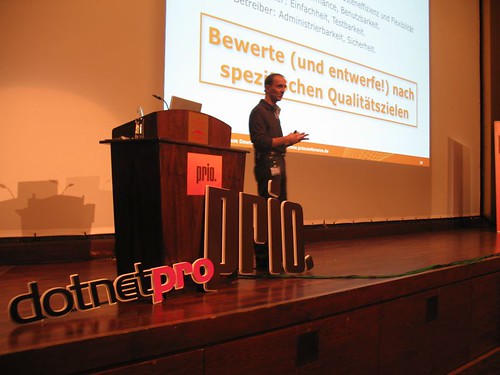
Zum zweiten Mal fand im November 2007 in Baden-Baden die famose Prio-Konferenz statt, auf der ich (mal wieder) das spannende Thema "Bewertung von Software-Architekturen" vorstellen durfte.

Die Prio ist einen Besuch wert, weil sie als so genannte "Themenkonferenz" eine konsiste und wohlstrukturierte Darstellung eines zentralen "Leitgedankens" verfolgt (dieses Jahr war es "Qualität").

Meinen Vortrag (inklusive ausführlichem Text dazu) gibt zum Download.

Ein kleiner (optischer) Eindruck:

prio2007-gst.jpg

26 November 2007

Sh** happens - therefore everybody needs a backup strategy

Did you ever lost data due to an accidental "rm -r *" command? Or because your spouse just installad the newest service pack of any operating system which caused your machine to cease working?

I know about failures of humans and machines. I never want to loose digital assets due to such failures, therefore I designed and implemented a broad backup strategy.

But first things first. Let's start with the kinds of sh** that can happen:

Risks to Digital Assets


  • Theft: Some nice guy steals your precious notebook with your even more precious digital assets on its drive.

  • Damage: Your drive gets sick due to headcrash or an overdose of spilled coffee (I mostly stick to green tea, but they say that is equally fatal for harddrives).

  • Accidental deletion: Wether it is "rm -r *" on unix machines or its equivalent on graphical user interfaces - users sometimes (involuntarily) erase their own data. All right, you might get it back from the recycle bin... unless somebody cleans that one

  • Viruses or other data corruption: My special friends are office applications, killing large documents. I'm sure you've experienced that one yourself...


My Goals Concerning Backups


  • Continue working as fast as possible.

  • Highly automated backup - the fewer manual processes the better.

  • Cover different computers with various kinds of valueable data

  • Affordable. Keep the price-tag in personal range.


My Infrastructure


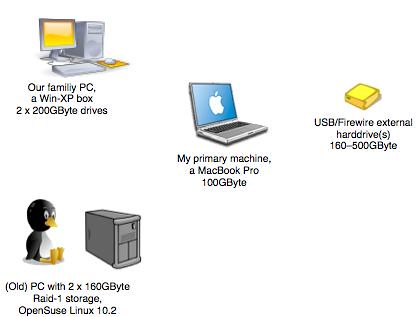
I'm working as freelancing IT-consultant in Germany, therefore I don't have too many machines to care for. The following diagram shows my infrastructure - which is primarily used by my wife (Cheffe Uli, for text processing, billing, accounting and other organizational tasks required to run a business).
zorg-computers.jpg

  • My primary machine is a MacBook Pro

  • I use two different external USB drives. They contain all our digital music (approx 40GByte) and a copy of all our photos.

  • An old PC runs OpenSUSE Linux 10.2 (very smoothly!) and contains two 160 GByte drives, which I configured as RAID-1 (mirrored) with the SUSE Yast configuration utility. The OS itself is located on a third drive. A few directories of the RAID can be mounted via Samba on our other machines.


The Pillars of My Backup Strategy

zorg-backup-strategy.jpg

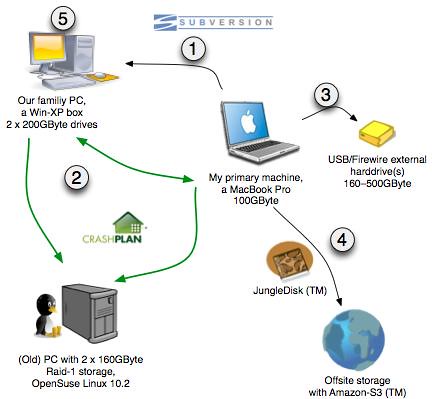
  1. Of course I use a version control system (Subversion). I setup my (home) repository on our win-XP machine. Every project file I work on is regularly commited to subversion.

  2. I fall in love with CrashPlan, a Java-based (commercial) lifesaver to backup arbitrary files and directories to arbitrary other machines (which must have a free version of CrashPlan installed). I backup the following things:

    • My Mac's valueable data to our home PC and to my RAID-1 linux server.

    • My wife's data from the home-PC to my Mac and to the RAID-1 server.

    • Not on the diagram: I backup all our data to my parents PC.


  3. Every week I copy my complete MacBook-drive to one partition of an external drive (with SuperDuper). Uneven weeks are copied to partition #1, even weeks go to partition #2.

  4. All my valuable data (especially project-related files and photos) are copied to Amazon S3 (TM) offsite storage with a small utility called JungleDisk (a little webdav-server). JungleDisk encrypts the files, so nobody without my key can read my files.

  5. I copy the whole disk of our home-PC with Acronis TrueImage.

  6. (not on the diagram): I keep a USB-stick with a pre-configured JungleDisk installation with me at all times. In case I need to access some files, I just plugin the stick into ANY machine (Win, Mac or Linux) with an Internet connection - and can start working a few minutes later...

  7. (not on the diagram): I use Versomatic on the Mac (there is a Windows equivalent called RealTime Backup), which stores versions of all my working files in its own repository. Whenever I save a file in any application, Versomatic creates a new version in its repo... so I can go back in time (like TimeMachine, but I can configure Versomatic to just backup what I need!).

  8. (not on the diagram): I backup files with iBackup - creating timestamped backup-sets on external drives or sometimes even on CDs or DVDs. I tried several others, including DobryBackup, but iBackup is simply better...

  9. (not on the diagram): I keep a copy of SpinRite, the awesome disk analysis and repair utility from fabulous Steve Gibson. It can recover even bad disk failures (but is way to slow for USB-connected drives...)


Now what?


Let us review the list of risks from the beginning:

  • Theft: If somebody steals my Mac, I'll have to get a new one. Bad enough. I'll be productive within minutes due to my SuperDuper backups.

  • Damage: Every drive in our infrastructure is backed up somewhere. It might take a while to replace the computer, but I can easily restore every file, from JungleDisk or CrashPlan or Subversion or another of my copies.

  • Accidental deletion: It'l be fatal if I deleted my subversion repository, but even that is safely copied by CrashPlan to several destinations (and not automatically deleted there!). Looks like I can survive a few of my own brain-blackouts...

  • Viruses or other data corruption: See above. Several possibilities to get back to consistent versions, depending on the kind of damage.


I'm not fully automated in my backups - but that's ok for me.


Apart from those (technical) risks, what else can happen?

  • You forget your passwords? Print out a list of important passwords, seal it in an envelope and deposit with trusted friends.

  • Your house burns down. All computers within are destroyed. As long as you remember your JungleDisk password or your CrashPlan-ID, you're done... External backups have their merits...

  • I keep a number of boot-CD's ready... for example a grand-universal-windows-boot-disk


Conclusion


I'm pretty sure you guys come up with some risks I forgot. The major pillars in my backup strategy are CrashPlan, JungleDisk and redundancy...

22 November 2007

Trunk Monkey: Awesome Videoclips

Here you find four short videoclips about TrunkMonekey - really funny. I liked Monkey3 best!

21 November 2007

Some Online Articles on Tags+Folders, Rule-based-Systems and Governance

Just minutes ago I struck a deal with SIGS-Datacom, publisher of the (German)
OBJEKTspektrum and JAVAspektrum, so that my recent articles in those magazines are now available as pdf-downlad for free...


  • Ordnung 2.0: Hilfe für den Info-Dschungel: Reality-Check von tags-versus-folders


  • Wohin mit der Logik: Regeln als Rettung. Der Artikel beschreibt, wie Sie Fachlogik mit Hilfe von Regelmaschien aus Ihrem Quellcode auslagern können - mit viel Flexibilität und signifikanten Risiken...


  • SOA Governance ist ein wesentlicher Erfolgsfaktor für SOA. (Mit Arne Koschel). Bei unserem Plädoyer für SOA-Governance gehen wir davon aus, dass für SOA

  • Regelbasierte Systeme (mit JBoss-Drools). Der Artikel stellt JBoss-Drools vor, einen bewährten Open-Source Vertreter Java-basierter Regelmaschinen.


SOA Governance: Crucial Necessity or Waste of Time?

As I occasionally worked on SOA Governance during the last few years, I took the time
to write up this article on InfoQ (did you know that is a great platform?)

From the intro:

The term "governance" has been regularly appearing in IT publications and conferences for some time, but among technical circles, such discussions are often yawn-provoking at best. This article provides a developer-friendly guide to SOA Governance, starting with the general notion of IT governance down through design-time and the second runtime Governance.


I'm eagerly awaiting your comments...

16 November 2007

Köln: Bürger dürfen mitbestimmen

Nur für Kölner: Die Stadt bietet hier die Möglichkeit, per Internet (vorher: einfache Registrierung) über Spar- und Ausgabenvorschläge abzustimmen.

Sehr schön für aktive Bürger der Stadt - unbedingt mal reinschauen (ich habe für Vorschlag 2488 gestimmt..)

15 November 2007

Business-Rule Technology becomes Acquisition Target...

Australian based RuleBurst just acquired Haley Technologies, one of the thought-leaders in rule-based technologies... (announced here and on the JBoss-Drools Mailing list).

A few days ago, SAP bought Indian-based Yasu (provider of the QuickRules BRMS)...

Just in case you're interested in Rule-Engines - might be the right time to invest in those companies... they surely deserve a lot more corporate attention... problem is, most of them aren't public (yet)!

11 November 2007

Not Hungry? Try this Appetizer

Whow - just in case you still have no idea how to surprise your partner -
try one of those mouth-watering recipes.

I found it via Flickr...


07 November 2007

OOP 2008: Architektur braucht Iterationen

James Dyson, Erfinder des nach ihm benannten (ungeheuer lukrativen, coolen und innovativen) "beutelfreien" Staubsaugers, hat 15 Jahre lang iteriert, seine Architektur an 5000 Prototypen getestet (so berichtet die Atlantic Systems Guild in ihrem genialen Buch "Adrenalin-Junkies und Formular-Zombies" (Pattern 84, Schonzeit für Ideen).

Sagt am Beispiel eigentlich alles. Hervorragende Architekturen brauchen ein paar Iterationen (manche mehr, manche weniger). Während dieser Iterationen ändern sich einige Anforderungen - und schon haben wir die Agilität im Spiel.

Also: Sieht in etwa wie folgt aus: Kunde und Umwelt ändern Anforderungen, Architekten reagieren...

architektur-und-umwelt.png


Ein aus meiner Sicht halbwegs realistischer Prozess der Architekturentwicklung sieht etwa so aus:

arc-prozess.png

Sie sehen: Schleifen. Iterationen. Versuch-Scheitern-Lernen-Verbessern. So funktioniert Architektur.


Dynamic Language Shootout...

You want a new notebook? You know Ruby, Smalltalk, Scheme, Lisp or Python (or Prolog...)?

There's a dynamic language shootout (in German) with some nice prices (a notebook, an iPod etc).

You gotta release your solution under GPL... and fill in a form, seems pretty harmless. And: The task
is brilliant, a little AI, a little UI, loads of fun.

Go, participate. If I find the time, I'll submit a Prolog solution :-)

(Another) visual thesaurus...

I already knew the commercial VisualThesaurus, but found a free (online)
version names Visuwords - great to visualize relationships between words. Click and hold to move the image within the browswer -

Have a look at one example (from Visuwords):

visuword.jpg

worth a try - at least for me as non-native speaker (when writing english...)